Critic #2: Nichole
I like the second version of the relationship diagram. Add content to signify what you are talking about.
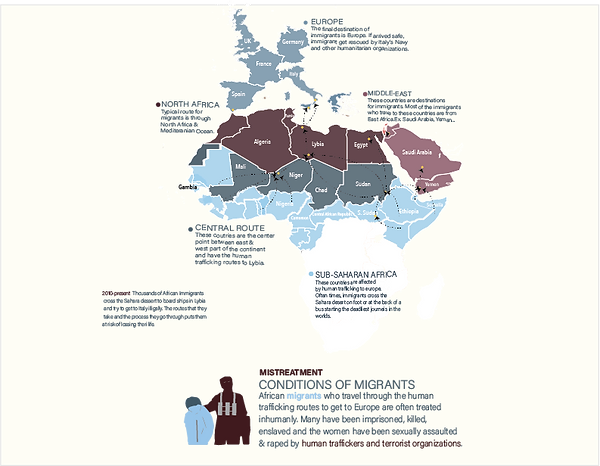
I added a map and identified regions that has a large concentration of migrants, where they start their journeys and end up traveling to.
revisions:
Critic #3: Constance
Fix the lines and shapes directions and add another prominent color.
I fixed shapes and used my visual potential model to represent text, layout, colors coding and labels accordingly.
revisions:
Critic #1: Calvin
Add a header to your relationship diagram.
I added a title/header to my infographics to be descriptive of what my topic is.
revisions:
Critic #2: Wo Bin
Take out the highlight or the line for regions that are easy to see. Use the curves and lines for the regions that are not easy to use.
I reduced the use of curves that highlight the regions to only be used for regions that are hard to differentiate.
revisions:
Critic #1: Jae
Include the red color that is used in the color model. Specify what the cross relationship stands for.
Emphasised the dark burgundy color but did not add red color because I wanted to differentiate between regions of the continent strictly with different colors rather than similar colors.
revisions:
Critic #3: Charlene
Take out the outline, add one more color (the light burgundy) and fill in the rest of the map with colors.
I added light burgundy based on my color model. I also reduced the stroke/outline of the map to match my visual design model, however, I did not completely take them out because they give context as a whole.
revisions:
Critique 1 Message & Emulation
These diagrams are showing the causation of migration and the process it takes to get to ideal destinations from East and West Africa. >
The layout of version 1 relationship diagram signifies the start and the endpoints of the migrants and the average reason or cause that makes them leave in the first place.
To emulate my color model I used the four colors that stood out and dominated the infographics. These colors differentiate causes as well as actual things.
To emulate my visual language model I landscape layout and colors.
To emulate my typography model I use the same font weight, size, type, and colors.
Sources/Credits: <Image>
Critique 2 Message & Emulation
This relationship diagram shows the regions of the African continents in which migrants come from and go to. As they travel north migrants face more violence and uncertainty. I used colors to express this point.
To emulate my color model I used 4 colors that got from my model.
To emulate my visual language model I used curve shapes and dashed lines to label a text.
To emulate my typography model I used similar color, weight, and font type.
Sources/Credits: <Map>


Relationship Elements & Critiques
Final Display Message & Emulation
This element represents the final relationship element that I choose to place on my infographics. My topic heavily relies on the location of the events and people around them, my relationship element is mostly conveyed through a location, routes, beginning and ending positions. As a result, I made the large part of my relationship element a map and color-coded text content that describes what occurs at each location. I tried to represent that the red areas are where most of the violence is committed against migrants and I tried to associate that using the silhouette.
To emulate my color model I used light blue, dark burgundy, dark green, & light red colors.
To emulate my visual language model I used silhouette and text content that is aligned left with a color-coded bullet point associated with the location.
To emulate my typography model I used Acumin Concept thin for the paragraphs and semibold for titles.
Sources/Credits: <The map data was provided by the professor, text content by CNN >